35 Ready-to-Use Message Templates for Language Teachers (Free Copy-Paste Tool)
Professional message templates for every teaching situation: payment reminders, cancellation notices, student onboarding, difficult conversations, and price increases. 3 tones, chat and email formats.
You know that feeling when you need to chase a student for payment and you stare at your phone for 10 minutes trying to figure out what to write? Or when a student asks for a discount and you want to say no without sounding rude?
Most language teachers lose hours every month crafting these messages from scratch. Worse, some avoid sending them at all, letting unpaid invoices pile up and boundaries get crossed.
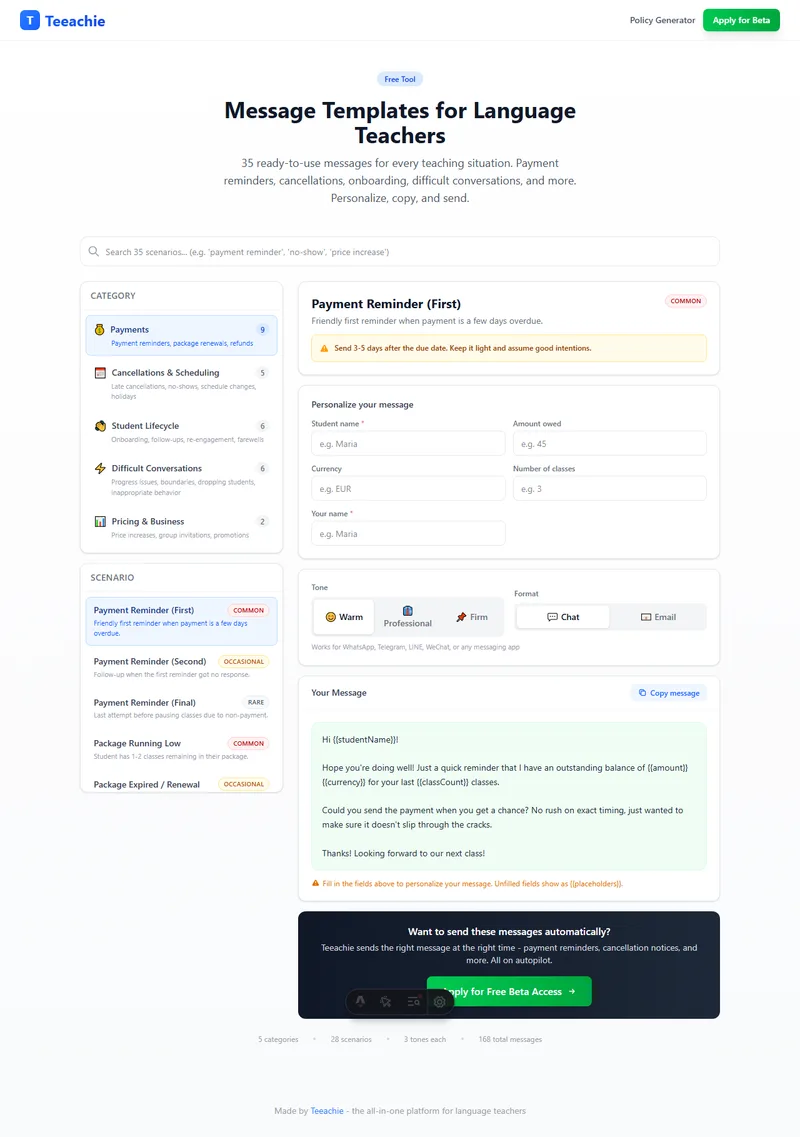
We built a free tool with 35 message templates covering every situation you’ll face as a language teacher. Each one comes in 3 tones and 2 formats. Here’s why it matters and how to use it.

Why Pre-Written Templates Save You More Than Time
The real cost of writing messages from scratch isn’t just the time. It’s the mental energy.
- Decision fatigue. Every time you draft a payment reminder, you’re making dozens of micro-decisions: how direct should I be? Should I mention the policy? Is this too harsh? Too soft?
- Inconsistency. Without templates, your tone shifts depending on your mood. A student who cancels on a good day gets a friendly pass. The same cancellation on a bad day gets a tense message. Students notice.
- Avoidance. The harder a message is to write, the more likely you’ll put it off. A “gentle reminder” that never gets sent is worse than a firm one sent on time.
- Professionalism. Templates help you sound like a business, not someone making it up as they go. This builds trust with students.
The 5 Categories Every Teacher Needs
After researching dozens of teaching communities and surveying independent language teachers, we identified 35 scenarios across 5 categories:
1. Payments (9 scenarios)
This is the category most teachers dread. Nobody wants to be the person chasing money. But if you don’t, you’re working for free.
Key scenarios include:
- Payment Reminder (First, Second, Final) - A 3-step escalation sequence. Start warm, get progressively more direct. Most students pay after the first reminder if it’s sent promptly.
- Package Running Low - Send when 2-3 classes remain. Frame it as a helpful heads-up, not a sales pitch.
- No-Show Charge Notification - The student missed class without notice. Reference your policy, not your feelings.
- Refund Requests (Approving and Declining) - Two separate templates because these situations require very different approaches.
Pro tip: Send payment reminders 3-5 days after the due date. The longer you wait, the harder it gets.
2. Cancellations and Scheduling (5 scenarios)
Late cancellations and no-shows are the most common source of friction between teachers and students. Having a pre-written response removes the emotional charge.
Key scenarios include:
- Late Cancellation (First Time vs. Repeat) - Different situations call for different responses. A first offense deserves grace. A pattern needs addressing.
- Teacher Cancellation - Yes, you need a template for when you cancel. Students appreciate professionalism even when the inconvenience is on your end.
- Holiday/Vacation Notice - Send 3-4 weeks in advance. Be specific about dates.
- Student Pause - Clarify what happens to their time slot when they take a break.
3. Student Lifecycle (6 scenarios)
From first contact to farewell, each touchpoint is an opportunity to build loyalty or lose a student.
Key scenarios include:
- Inquiry Reply - Speed matters. Teachers who respond within 2-4 hours convert significantly more inquiries into students.
- Welcome/Onboarding - Set expectations from day one: schedule, platform, cancellation policy.
- After First Class Follow-Up - Send within 24 hours while the experience is fresh. This is where trial students become regular students.
- Re-engagement - For students who disappeared. Lead with curiosity, not guilt.
- Referral Request - Ask after a milestone or positive moment, not out of the blue.
4. Difficult Conversations (6 scenarios)
These are the messages nobody teaches you to write. They’re uncomfortable but necessary.
Key scenarios include:
- Student Not Making Progress - Focus on what they can do differently, not what they’re doing wrong. Suggest a practice plan.
- Ending the Teaching Relationship - Sometimes it’s not a good fit. Be kind but clear. Offer to recommend another teacher.
- Inappropriate Behavior - Be direct and unambiguous. Document everything.
- Setting Messaging Boundaries - For students who text at all hours.
- Student Asking for a Discount - Never apologize for your pricing. Offer alternatives: packages, group classes, less frequent sessions.
- Chronic Lateness - Address the pattern, not a single instance.
5. Pricing and Business (2 scenarios)
- Price Increase Announcement - Give 4-6 weeks notice. Be direct. Optionally honor the old rate for existing packages.
- Group Class Invitation - Invite individual students to join a new group. Position it as extra practice at a lower cost, not a replacement.
3 Tones for Every Situation
Every template comes in three tones:
- Warm - Friendly, empathetic, relationship-first. Best for first-time situations, long-term students, and when you want to preserve goodwill.
- Professional - Neutral, clear, business-like. Works in most situations. Good default if you’re unsure.
- Firm - Direct, concise, no-nonsense. Use for repeat issues, clear policy violations, or when warmth hasn’t worked.
The right tone depends on context, not personality. You might use “warm” for a first-time late cancellation and “firm” for the third one from the same student. The templates give you the flexibility to match the situation.
Chat vs. Email Format
Each template is available in two formats:
- Chat - Shorter, more casual. Works for WhatsApp, Telegram, LINE, WeChat, Discord, or any messaging app.
- Email - Longer, more structured. Includes subject lines. Better for formal situations, new students, or when you want a paper trail.
How to Use the Templates
- Find your scenario - Browse by category or search by keyword
- Fill in the details - Student name, amount, dates, etc.
- Pick your tone - Warm, professional, or firm
- Choose the format - Chat or email
- Copy and send - One click to copy, then paste into your app
It takes about 15 seconds. Compare that to 10 minutes of agonizing over wording.
Use the free Message Template Generator - all 35 scenarios, 3 tones, chat and email formats.
Want These Messages Sent Automatically?
Templates save time, but you still have to remember to send them. What if your teaching platform handled it for you?
Teeachie tracks student payments, detects late cancellations, and sends the right message at the right time. No copy-pasting, no forgetting, no awkward conversations.
We’re currently in private beta. Apply for free beta access - 3 months free and a lifetime 50% discount for early adopters.
Related: Handle late payments from students | Cancellation policy guide | How to reduce no-shows | Payment features | Messaging features