Understand your student dashboard
Learn what's on your dashboard and how to quickly access your classes, materials, and important information.
Understand your student dashboard
Your dashboard is your home base in Teeachie. It shows everything you need at a glance.
Dashboard sections
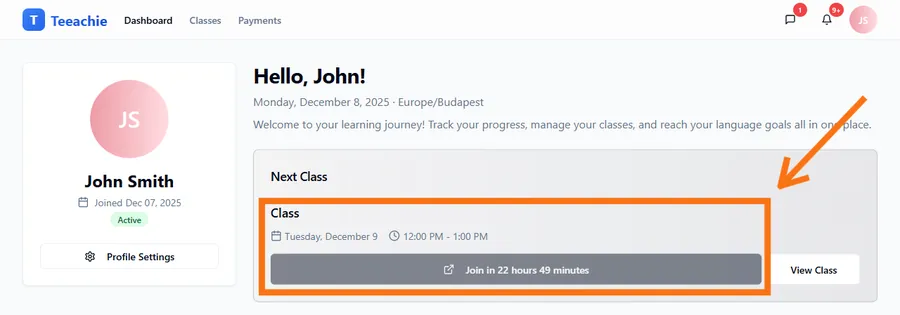
Next Class card
The most prominent card shows your upcoming class:
- Date and time – When the class is scheduled
- Teacher name – Who you’re learning with
- Meeting link – Click to join when it’s time
- Join button – Shows “Join in X minutes” when class is approaching
My Learning Progress
See your individual class stats at a glance:
- Individual Classes Remaining – Prepaid classes available
- Account Balance – Your current credit balance
- Price per Class – Your rate per session
Calendar
A calendar on your dashboard showing upcoming classes:
- View all your scheduled classes
- Click any class to open its details
- Navigate between weeks and months
Group Classes card
If you’re in any groups:
- Your group enrollments
- Group classes remaining
- Whether any payments are due
Actions from the dashboard
Join a class
When a class is starting:
- Find the meeting link on the Next Class card
- Click Join or the link
- Your video call opens in a new tab
View class details
Click on any class to see:
- Full class information
- Materials shared by your teacher
- Your personal notes
Access your schedule
Use the Classes link in the navigation to see:
- All upcoming classes
- Past class history
- Filter and sort options
Dashboard tips
Check before class
Visit your dashboard 5-10 minutes before class to:
- Find the meeting link
- Review any materials
- Make sure you’re prepared
Notice changes
You’ll see updates reflected on your dashboard when classes are rescheduled or new materials are added. You’ll also receive in-app notifications via the bell icon in the header.
Quick navigation
The dashboard provides shortcuts to everything else:
- Click sections to dive deeper
- Use the navigation menu for full access
Mobile dashboard
On mobile devices:
- Same information in a mobile-friendly layout
- Cards stack vertically
- Touch-friendly buttons and links
What’s next?
- View your classes – Full schedule
- Join a class – Meeting links
- Self-schedule – Book classes
Need help?
Questions about your dashboard? Contact support.