Welcome to Teeachie (for students)
Get an overview of your student dashboard and learn what you can do in Teeachie.
Welcome to Teeachie (for students)
Welcome to Teeachie! This platform helps you stay organized with your language classes, access materials, and communicate with your teacher.
Your student dashboard
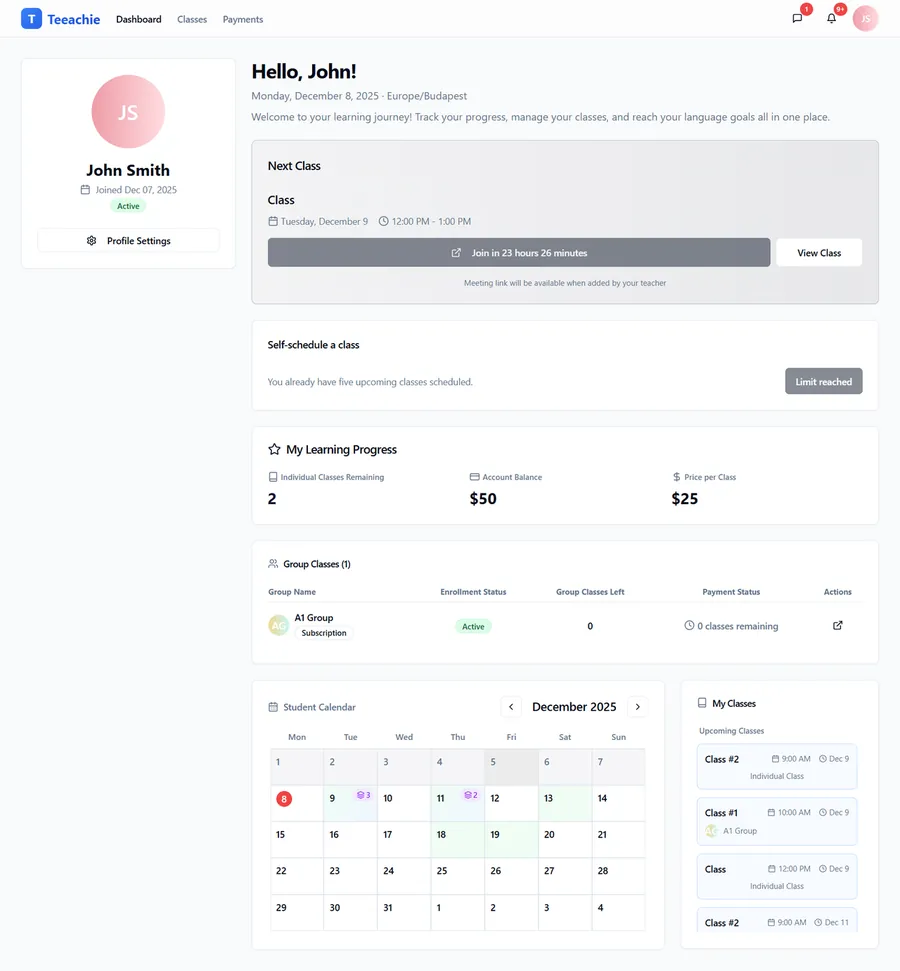
When you sign in, you’ll see your dashboard with:
- Next Class – Your upcoming class with date, time, and meeting link
- My Learning Progress – Individual classes remaining, account balance, and price per class
- Calendar – Your class schedule at a glance
- Group Classes – Card showing your group enrollments and remaining sessions
What you can do in Teeachie
View your classes
- See all upcoming classes on your calendar
- Access meeting links to join video calls
- Review past classes and materials
Access class materials
- Download files your teacher shares
- Review lesson notes and resources
- Everything organized by class date
Submit homework
- Upload homework files for your teacher
- Track what you’ve submitted
- Keep notes for yourself
Self-schedule classes
If your teacher enables it:
- View available times
- Book classes that fit your schedule
- Manage your own bookings
Communicate
- Message your teacher directly
- Receive notifications about class changes
- Stay informed about your learning
Your schedule
The calendar shows all your classes:
- Individual classes – One-on-one with your teacher
- Group classes – With other students
- Color coding helps distinguish class types
Click any class to see details and access the meeting link.
Getting started checklist
- ✅ Accept your invitation – Create your account
- ✅ Check your profile – Verify timezone and settings
- ✅ View your first class – Find the meeting link
- ✅ Explore materials – See what your teacher has shared
Navigation
Find your way around:
| Section | What’s there |
|---|---|
| Dashboard | Overview and quick actions |
| Classes | Full schedule and class history |
| Payments | Your payment history |
Additional access:
- Messages – Open from the chat icon in the top-right header
- Settings – Open from your avatar menu
Need help?
- Browse the Help Center for answers
- Message your teacher with questions about classes
- Contact support for technical issues
What’s next?
- Accept your invitation – If you haven’t yet
- View your classes – See your schedule
- Join a class – Find the meeting link
Questions? Contact support anytime.
Updated December 2, 2025