Why a class, group, or material might be missing
Common reasons why you can't find classes, groups, or materials, and how to resolve the issue.
Why a class, group, or material might be missing
Can’t find something you expected to see? Here are common reasons and solutions.
Missing classes
Class not scheduled yet
Reason: Your teacher hasn’t scheduled the class yet.
What to do:
- Check back later
- Ask your teacher about scheduling
- If you have self-scheduling enabled, book your own class
Looking at wrong date range
Reason: The class exists but isn’t in the current view.
Solution:
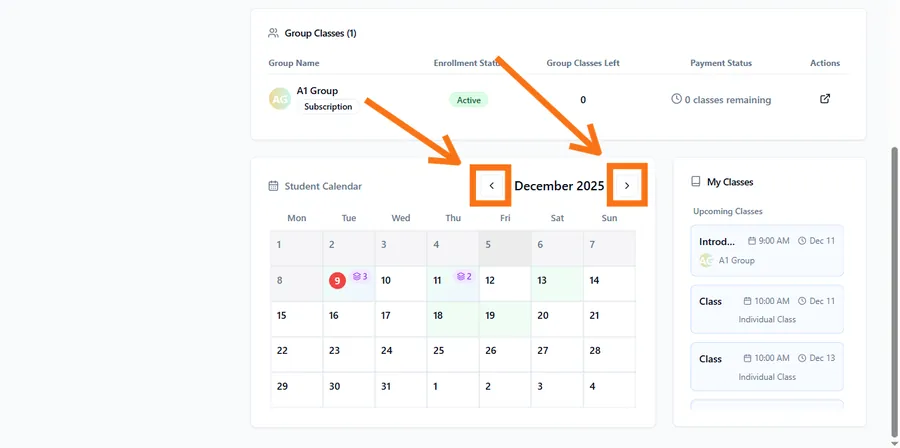
- Navigate to different weeks/months in your calendar
- Check both past and future dates
- Use the date picker to jump to specific dates
Class was cancelled
Reason: Your teacher cancelled the class.
Solution:
- Check for a cancellation notification
- Look in your notification history
- Ask your teacher about rescheduling
Timezone mismatch
Reason: Your timezone setting might be wrong.
What to check:
- Go to your profile settings
- Verify your timezone is correct
- Classes show in your local time
Invitation not fully accepted
Reason: Your account setup may be incomplete.
Solution:
- Ensure you completed the invitation process
- Try logging out and back in
- Contact your teacher to verify your connection
Missing groups
Not added to the group yet
Reason: Your teacher hasn’t added you to the group.
What to do:
- Ask your teacher if you should be in the group
- Wait for them to add you
Group was archived
Reason: The group may no longer be active.
Solution:
- Contact your teacher about the group status
- They can tell you if it’s archived or ended
Viewing wrong section
Reason: You may be looking in the wrong place.
Where to look:
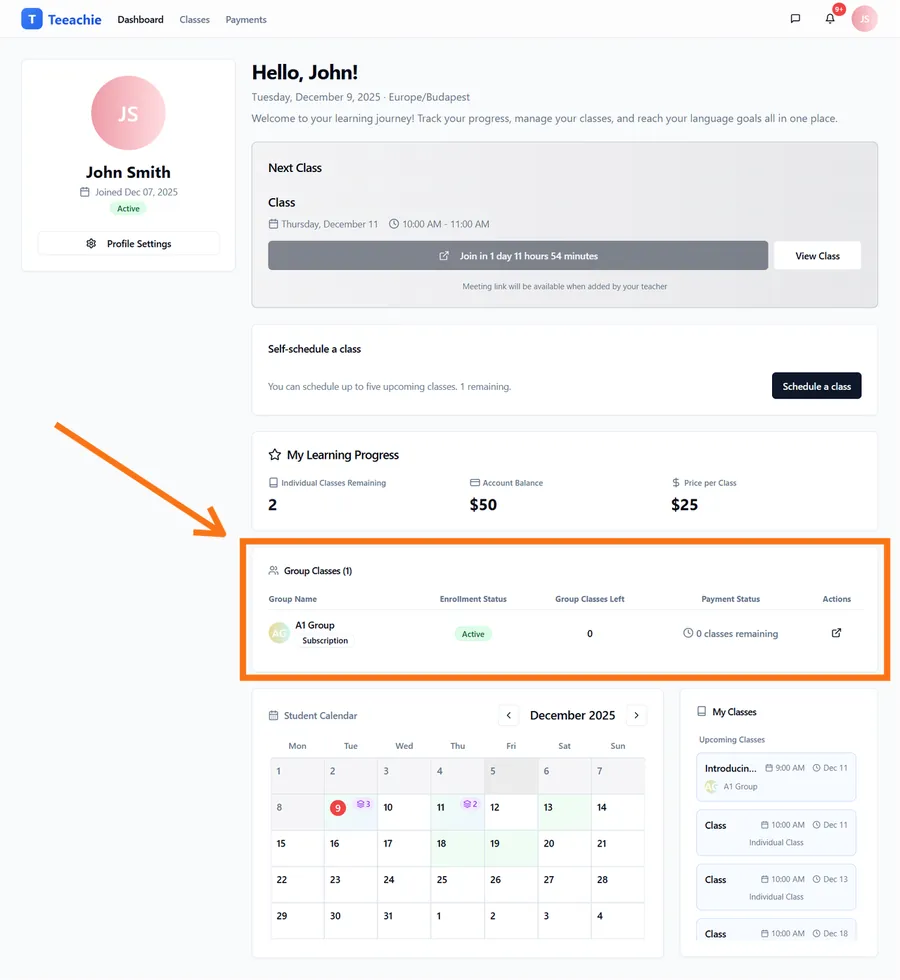
- Dashboard – Group Classes card
- Classes page – look for group class entries with group names
- Your calendar for scheduled group sessions
Missing materials
Not uploaded yet
Reason: Your teacher hasn’t uploaded materials for this class.
What to expect:
- Not all classes have additional materials
- Teachers often upload closer to class time
- Check back before your class
Materials are on a different class page
Reason: You might be looking at the wrong class.
Solution:
- Check the specific class page for your upcoming lesson
- Each class has its own materials section
- Navigate to the correct date’s class
File access issue
Reason: There might be a download problem.
What to try:
- Refresh the class page
- Try clicking the download again
- Use a different browser
- Check if the file type is supported on your device
Missing homework submissions
Upload didn’t complete
Reason: The file upload may have failed.
Solution:
- Go back to the class page
- Check if your file appears in the homework section
- Re-upload if it’s missing
Looking at wrong class
Reason: Homework is attached to specific classes.
Solution:
- Navigate to the correct class page
- Each class shows its own homework section
Missing payment records
Payment not recorded yet
Reason: Your teacher hasn’t logged the payment yet.
What to do:
- If you recently paid, give your teacher time to record it
- Ask your teacher to confirm payment was logged
Looking in wrong place
Reason: Payments may be in a different section.
Where to find payments:
- Payments page (top navigation: Payments)
- My Learning Progress card on dashboard – shows balance and classes remaining
- For group enrollments, ask your teacher to confirm your enrollment status
General troubleshooting
Refresh the page
Many issues are solved by a simple page refresh.
Clear browser cache
- Go to browser settings
- Clear cached data
- Reload Teeachie
Log out and back in
Sometimes session issues cause display problems:
- Log out completely
- Close the browser
- Reopen and log in again
Try a different browser
If one browser has issues, test with another:
- Chrome
- Firefox
- Safari
- Edge
Check your internet connection
Slow or unstable internet can cause:
- Pages not loading fully
- Data not appearing
- Updates not syncing
Data visibility rules
What students can see:
- Their own classes and schedule
- Groups they belong to
- Materials shared with them
- Their own homework submissions
- Their own payment records
What students cannot see:
- Other students’ private information
- Teacher’s full student list
- Classes between teacher and other students
- Other students’ homework
When to contact your teacher
Contact your teacher when:
- Expected classes aren’t showing up
- You should be in a group but aren’t
- Materials were promised but aren’t available
- Payment records look incorrect
When to contact support
Contact Teeachie support when:
- You’re experiencing technical errors
- Pages won’t load at all
- Your account seems broken
- Your teacher isn’t sure what’s wrong
What’s next?
- View your classes – Navigate schedule
- Contact support – Get help
- Access materials – Find files
Need help?
Still can’t find what you’re looking for? Contact support.