Understand groups and group classes
Learn what groups are, how group classes work, and your relationship with other students in your group.
Understand groups and group classes
Your teacher may have you in one or more groups for classes with other students. Here’s how groups work.
What is a group?
A group is a collection of students who take classes together:
- You share class time with other students
- Everyone has the same teacher
- You learn alongside your classmates
Groups are common for:
- Conversation practice
- Structured courses
- Cost-effective learning
- Social learning environments
Group vs individual classes
| Individual | Group |
|---|---|
| Just you and teacher | Multiple students |
| Personalized focus | Shared discussion |
| Flexible scheduling | Fixed group times |
| One-on-one attention | Peer interaction |
You might have both individual and group classes with the same teacher.
Find your groups
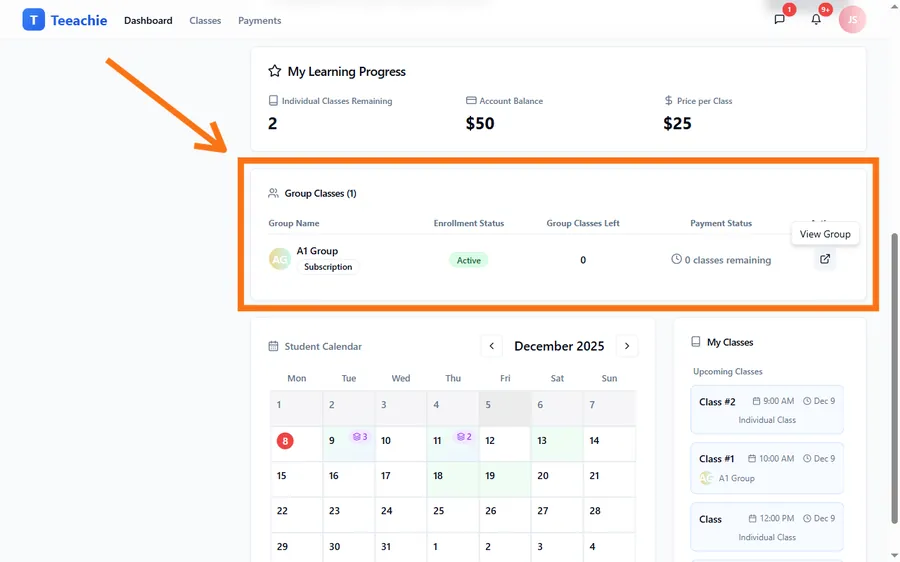
On your dashboard
On your dashboard, look for a card that highlights your group classes. This card helps you:
- See which groups you’re in
- View upcoming group classes
- Open group pages for more details
Group profile
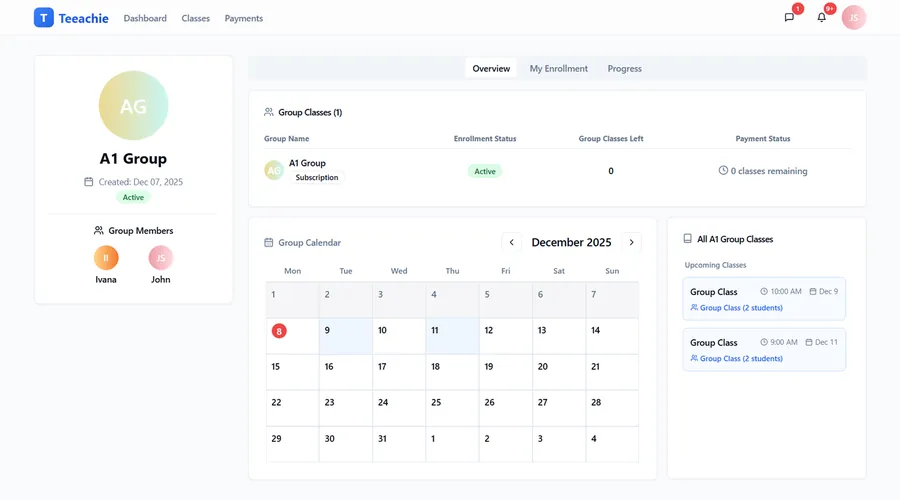
When you open a group from your dashboard or from a link your teacher shares, you’ll see a group page showing:
- Group name and description
- Your classmates (names and avatars)
- Upcoming classes for the group
- Your enrollment status and sessions
Your classmates
In a group, you can see limited information about other students:
- ✅ Names – Who’s in the group
- ✅ Avatars – Visual identification
- ❌ Contact info – Private
- ❌ Payment details – Private
- ❌ Homework – Private
This lets you recognize classmates while maintaining privacy.
Group classes on your calendar
Group classes appear on your calendar:
- Marked differently from individual classes
- Show the group name
- Include meeting links when available
Attending group classes
When it’s time for group class:
- Find the class on your dashboard or calendar
- Click the meeting link
- Join the video call with your classmates
- Your teacher manages the session
Enrollment
Your teacher enrolls you in groups and assigns offers (payment plans):
- Package – Fixed number of sessions
- Subscription – Ongoing access
Your enrollment status and sessions remaining appear on the group profile.
What’s next?
- View your group schedule – See all group classes
- View your classes – Full schedule
- View payment history – Your payments
Need help?
Questions about your groups? Contact support or ask your teacher.