How to contact Teeachie support (teacher view)
Learn how to reach Teeachie support and get help with your account, technical issues, or questions.
How to contact Teeachie support
Need help with something the help center doesn’t cover? Here’s how to reach our support team.
Contact methods
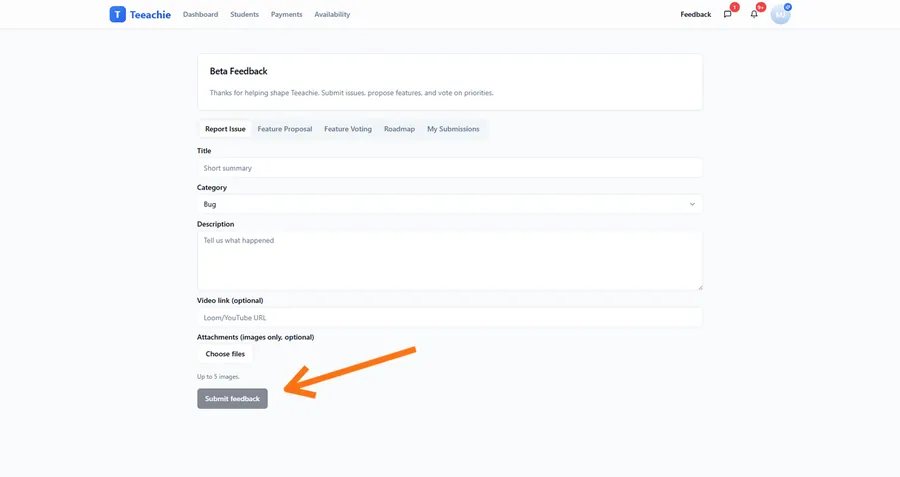
In-app feedback (beta testers)
If you’re a beta tester, the fastest way to reach us:
- Click Feedback in the top navigation bar
- Choose the tab that matches your goal:
- Report Issue to submit a bug or problem
- Feature Proposal to suggest new functionality
- Feature Voting to upvote existing ideas
- Roadmap to review what’s planned
- My Submissions to track your requests
- If submitting a report or proposal, complete the form (title, category if shown, description, and optional links/attachments)
- Click Submit feedback
Email support
For all users:
- Email: hello@teeachie.com
- Include your account email
- Describe the issue clearly
You can also use the Contact Support link at the bottom of any help article.
What to include in your message
Help us help you faster by including:
Account information
- The email address you use to sign in
- Your name as it appears in Teeachie
Problem description
- What you were trying to do
- What happened instead
- Any error messages (exact wording helps)
Context
- When the issue started
- How often it happens
- What you’ve already tried
Technical details (if applicable)
- Browser name and version
- Device type (computer, phone, tablet)
- Operating system
Screenshots
If possible, include:
- Screenshots of error messages
- Screenshots showing the problem
- Screenshots of where you’re stuck
What to expect
Response time
We aim to respond within:
- 24-48 hours for most inquiries
- Faster for urgent issues
- Longer during high-volume periods
Our process
- You submit your request
- We review and investigate
- We respond with help or questions
- We work together to resolve
- Issue closed when fixed
Follow-up
- Check your email for our response
- Reply to the same thread for continuity
- Let us know if the issue is resolved
Before contacting support
Try these first:
Check the help center
Browse articles for your topic – many questions are already answered.
Search for keywords
Use the help center search to find relevant articles.
Try basic troubleshooting
- Refresh the page
- Clear browser cache
- Try a different browser
- Sign out and back in
Check for known issues
We post updates about widespread issues when they occur.
Issue categories
Account issues
- Can’t sign in
- Password problems
- Email verification
- Profile updates
Technical issues
- Page won’t load
- Feature not working
- Error messages
- Display problems
How-to questions
- Using specific features
- Understanding functionality
- Best practices
Billing questions
- Payment recording
- Credit tracking
- Revenue reports
Bug reports
- Something broken
- Unexpected behavior
- Data inconsistencies
Feature requests
- Suggestions for improvements
- New feature ideas
- Workflow enhancements
Urgent issues
For critical problems affecting your ability to teach:
- Mark your feedback as urgent if available
- Include “URGENT” in email subject lines
- Describe the immediate impact
- Provide your contact information
We prioritize:
- Can’t access account
- Missing critical data
- Issues affecting live classes
Feedback and suggestions
We welcome your input:
Feature requests
Tell us what would make Teeachie better for you.
Improvement ideas
Share suggestions for existing features.
Beta feedback
If you’re a beta tester, your feedback shapes the product.
Community resources
Coming soon:
- Community forums
- User guides
- Video tutorials
- Webinars
What’s next?
- Login troubleshooting – Common login fixes
- Missing data guide – Find hidden items
- Help center home – Browse all articles
We’re here to help
Our support team wants you to succeed with Teeachie. Don’t hesitate to reach out – no question is too small.
Contact support anytime you need assistance.