View your payment history
Learn how to view your payment records for individual and group classes.
View your payment history
Your teacher records payments when you pay for classes. Here’s how to view your payment history.
Access your payments
From your dashboard
- In the top navigation, click Payments.
- You’ll see your payment summary and detailed history.
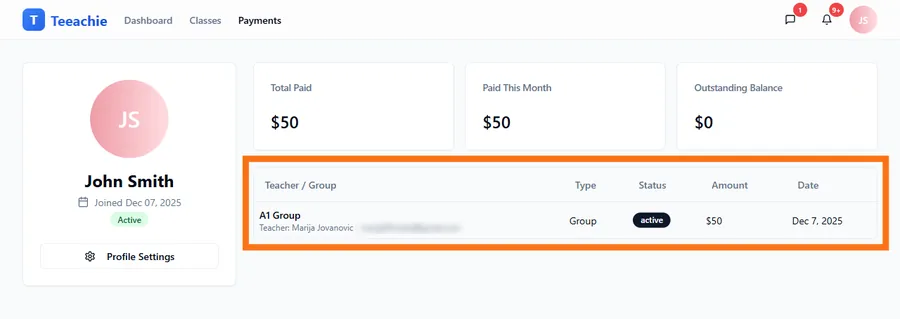
What you’ll see
Payment list
Each payment record shows:
- Teacher / Group – Who the payment is associated with
- Type – Package, subscription, or individual classes
- Status – Whether the payment is active, cancelled, or refunded
- Amount – How much was recorded
- Date – When your teacher recorded the payment
Payment summary
At the top, you’ll see summary cards that give you an overview of your payments. These may include totals you’ve paid, any outstanding amount, and other key figures. The exact metrics can change over time as the system improves.
Individual class payments
For 1:1 classes with your teacher:
- Payments are added to your Account Balance
- Balance is deducted when classes are completed
- You can see how many Classes Remaining you have on your dashboard
Example
If you paid $200 and your class price is $20:
- $200 added to your Account Balance
- Each completed class deducts $20
- Dashboard shows 10 Classes Remaining
Group class payments
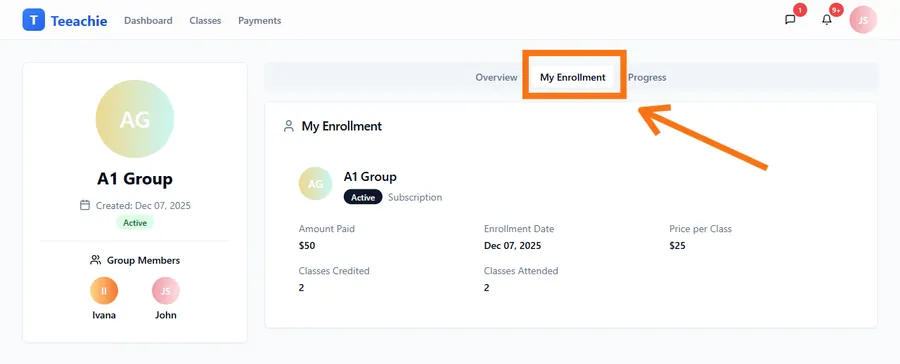
For group classes:
- Payments are tied to your enrollment
- Sessions remaining shows how many classes are left
- Subscription payments may show recurring info
Payment types explained
Package
- Fixed number of classes
- Pay once, attend set number of sessions
- Classes remaining decreases after each attended class
Subscription
- Ongoing access
- May be weekly, monthly, or custom interval
- Continues until cancelled
Pay-per-class
- Pay for each class individually
- No prepaid credits
Understanding your balance
Account Balance & Classes Remaining (individual classes)
- Account Balance shows your prepaid amount
- Classes Remaining shows how many classes that covers (balance ÷ class price)
- Balance decreases when classes are completed
Sessions remaining (group classes)
- Shows group sessions left in your package
- Based on attendance tracking
Outstanding balance
- If your teacher tells you there is a balance due, talk to them about how and when to pay
- Your teacher handles all billing arrangements and updates the records
Payment history details
For each payment row, you can see:
- The full amount and date
- What it was for (individual classes, a package, or subscription)
- A short reference or note if your teacher added one
Questions about payments?
Talk to your teacher
Your teacher handles all billing:
- Payment methods
- Pricing changes
- Refund requests
- Balance questions
Payment recorded incorrectly?
If something looks wrong:
- Don’t worry – mistakes happen
- Message your teacher
- They can review and correct the record if needed
Privacy
Your payment information is private:
- Only you and your teacher can see it
- Other students cannot view your payments
- Group classmates don’t see individual payments
What’s next?
- View your groups – Check enrollments
- See your schedule – Upcoming classes
- Message your teacher – Ask questions
Need help?
Questions about your payment history? Contact support or message your teacher directly.
Updated December 2, 2025